
🔎 Cloudflare Tail Workers + qryn

Co-Founder and CEO at QXIP, makers of HOMER, HEPIC, QRYN and contributors to many other OSS projects in the monitoring and observability space
Supercharge Your Observability: Using Cloudflare Tail Workers with qryn
In the ever-evolving landscape of cloud computing and web services, observability has become a critical aspect of maintaining robust and efficient systems. Today, we're excited to explore a powerful combination: Cloudflare Tail Workers and qryn, the polyglot observability stack compatible with Loki, Prometheus, Tempo and Pyroscope. This integration allows you to stream logs and events from your Cloudflare Workers directly into your observability platform, providing real-time insights and enhancing your ability to monitor and troubleshoot your applications.
What are Cloudflare Tail Workers?
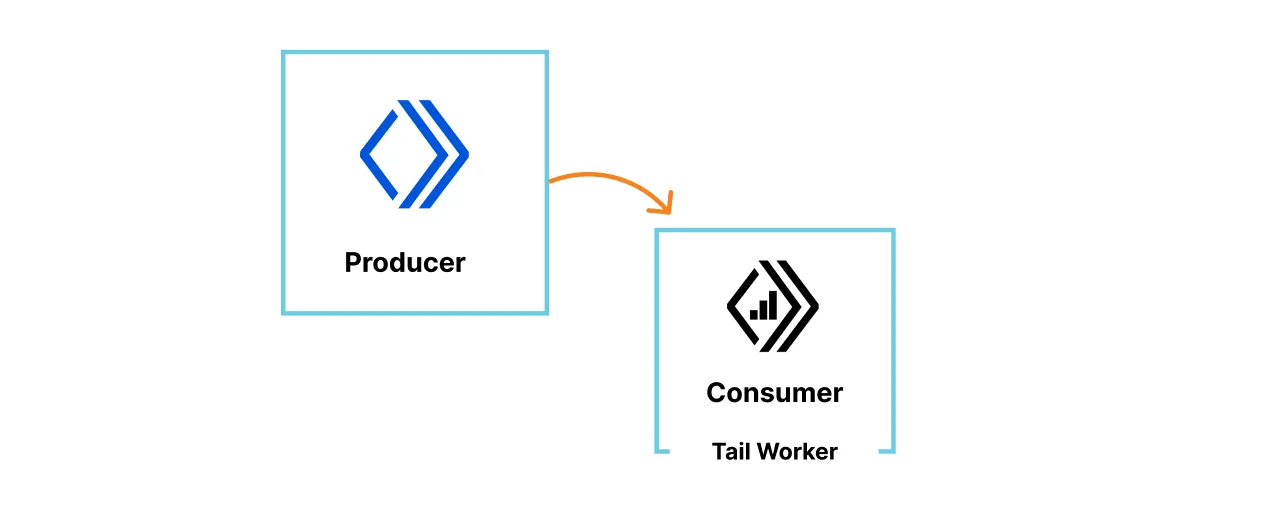
Cloudflare Tail Workers are a special type of Cloudflare Worker that allows you to process and forward logs and events from your other Workers in real-time. They act as a "tail" to your main Workers, catching and processing the output stream. This feature is incredibly useful for:
Real-time log analysis
Error tracking and alerting
Performance monitoring
Security event processing
Tail Workers receive batches of events from your main Workers, allowing you to process, filter, or forward these events to external systems – in our case, qryn.
Configuring Cloudflare Tail Workers
To set up a Tail Worker, follow these steps:
Log in to your Cloudflare dashboard.
Navigate to the Workers section.
Click "Create a Service" and choose "Tail Worker" as the type.
Give your Tail Worker a name and click "Create Service".
In the editor, paste the code for qryn ingestion (shown below).
Save and Deploy your Tail Worker.
Connecting Tail Workers to Main Workers
Add the following to the wrangler.toml file of your Main Worker(s):
tail_consumers = [{service = "<TAIL_WORKER_NAME>"}]
Alternatively use the following procedure through the Cloudflare User-Interface:
Go to the main Worker you want to monitor.
In the Settings tab, find the "Tail Workers" section.
Select your newly created Tail Worker from the dropdown.
Save the changes.
Now, your Tail Worker will receive events from the main Worker.
The Code: Tail Worker for qryn
Here's our Tail Worker code that processes events and sends them to qryn.
// Function to create Loki POST query
function createLokiPostQuery(data) {
  const streams = data.map(item => {
    const labels = {
      scriptName: item.scriptName,
      outcome: item.outcome,
      url: item.event.request.url,
      method: item.event.request.method,
      colo: item.event.request.cf.colo
    };

    const labelString = Object.entries(labels)
      .map(([key, value]) => `${key}="${value}"`)
      .join(',');

    const entries = [];

    // Process logs
    item.logs.forEach(log => {
      entries.push({
        ts: log.timestamp.toString() + '000000', // Convert to nanoseconds
        line: JSON.stringify({
          level: log.level,
          message: log.message.join(' ')
        })
      });
    });

    // Process exceptions
    item.exceptions.forEach(exception => {
      entries.push({
        ts: exception.timestamp.toString() + '000000', // Convert to nanoseconds
        line: JSON.stringify({
          type: 'exception',
          name: exception.name,
          message: exception.message
        })
      });
    });

    // Process diagnosticsChannelEvents
    item.diagnosticsChannelEvents.forEach(event => {
      entries.push({
        ts: event.timestamp.toString() + '000000', // Convert to nanoseconds
        line: JSON.stringify({
          type: 'diagnosticsChannel',
          channel: event.channel,
          message: event.message
        })
      });
    });

    return {
      stream: {
        [labelString]: ''
      },
      values: entries.map(entry => [entry.ts, entry.line])
    };
  });

  return {
    streams: streams
  };
}

// Cloudflare Worker
export default {
  async tail(events) {
    // Process events using our createLokiPostQuery function
    const lokiPostQuery = createLokiPostQuery(events);

    // Grafana Loki API endpoint
    const lokiApiUrl = 'https://qryn.server/loki/api/v1/push';

    try {
      const response = await fetch(lokiApiUrl, {
        method: 'POST',
        headers: {
          'Content-Type': 'application/json',
        },
        body: JSON.stringify(lokiPostQuery),
      });

      if (!response.ok) {
        throw new Error(`HTTP error! status: ${response.status}`);
      }

      const result = await response.text();
      console.log('Successfully sent data to Loki:', result);
    } catch (error) {
      console.error('Error sending data to Loki:', error);
    }
  }
};
☝️ Update the lokiApiUrl parameter with your qryn or qryn.cloud URL endpoint ☝️
🔎 Ready to Tail
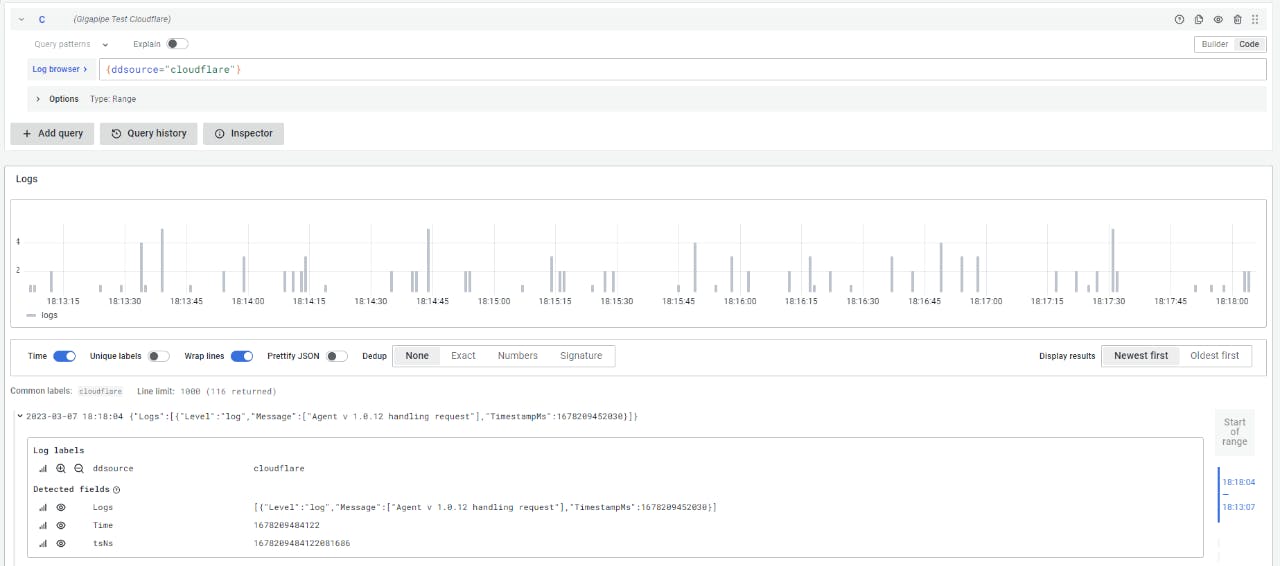
Your Workers tail should appear in your qryn instance. Select by using CloudFlare Workers Tail labels and search/filter/transform the logs using the Logs Explorer:
🔎 Tail Worker Labels:
- scriptName, outcome, url, method, colo
🎱 Benefits of This Integration
By integrating Cloudflare Tail Workers with qryn, you instantly gain:
Real-time log streaming: Get instant visibility into your Workers' behavior.
Centralized observability: Collect logs from all your Workers in one place.
Advanced querying and visualization: Leverage qryn's powerful features and its native integration with Grafana to analyze your data.
Scalability: Handle high volumes of log data with ease.
Conclusion
The combination of Cloudflare Tail Workers and qryn offers a robust solution for real-time observability of your Cloudflare Workers. By following the steps outlined in this post, you can set up a powerful logging pipeline that will give you deeper insights into your applications' performance and behavior.
Remember, good observability practices are key to maintaining reliable and efficient systems. Start leveraging these tools today, and take your monitoring capabilities to the next level!